Milan map poster
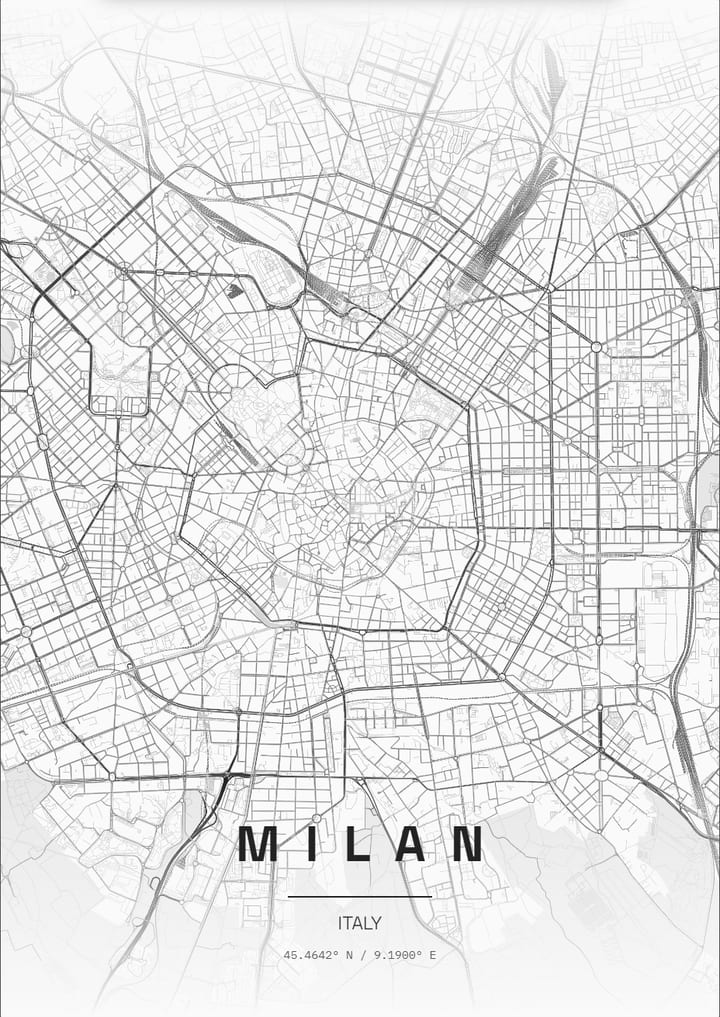
Ring roads circle the Duomo in widening arcs that trace the former city walls and canals, with radial streets crossing them.
- Theme: Contrast Zones, or pick from 50+ others
- Print sizes up to 100 cm with a live DPI readout
- PNG, print-ready PDF and layered SVG export
- Change the text, map layers and markers
- Contrast Zones theme: palette and example posters
About the Milan map poster
Milan has no river through its centre, so the poster is all about line work. The Duomo sits at the hub of ring roads that widen outward in clean arcs, each one marking where an older edge of the city once stood. Castello Sforzesco and Sempione Park form a leafy wedge to the northwest, and the Navigli canals curve away to the southwest as thin blue threads in a mostly grey field. Milano Centrale lies to the northeast with rail lines fanning out from it. Everything else is plain around it, so the rings stand out.
How to make your Milan poster
- Open the Milan design: the map is already centred on the city in the Contrast Zones theme.
- Change the theme, title and text, switch map layers on or off, and add your own markers.
- Pick a paper size and export a PNG, a print-ready PDF or a layered SVG.
Print sizes and file formats
Export sizes go up to 100 cm, with a live DPI readout so you can check the resolution before printing. The map is drawn from OpenStreetMap data, so every street, park and shoreline is the real layout of Milan.
Frequently asked questions
- Can I change the text on the Milan poster?
- Yes. The title, subtitle and coordinates line are all editable, so the poster can show Milan, a neighbourhood or a personal message.
- Which theme does the Milan example use?
- The Contrast Zones theme. It is only a starting point: any theme can be applied, and colours can be adjusted.
- Can I make a poster of another place in Italy?
- Yes. Search any city, address or landmark in the editor and the map recentres there.
More map posters of Italy
More city map posters
- London
- Istanbul
- Berlin
- Paris
- New York
- Tokyo
- Rome
- Barcelona
- Amsterdam
- Vienna
- Prague
- Lisbon
- Madrid
- Moscow
- Dubai
- Mumbai
- Singapore
- Sydney
- San Francisco
- Chicago
- Rio de Janeiro
- Buenos Aires
- Cairo
- Seoul
- Mexico City
- Hamburg
- Izmir
- Venice
- Copenhagen
- Stockholm
- Athens
- Budapest
- Cape Town
- Hong Kong
- Vancouver
- Kyoto
- Edinburgh
- Florence
- Dublin
- Oslo
- Helsinki
- Lyon
- Naples
- Bangkok
- Shanghai
- Toronto
- Washington, D.C.
- Reykjavik
- Porto
- Kuala Lumpur
- Munich
- Brussels
- Zurich
- Geneva
- Warsaw
- Krakow
- Marrakech
- Abu Dhabi
- Delhi
- Taipei
- Beijing
- Osaka
- Hanoi
- Ho Chi Minh City
- Melbourne
- Auckland
- Lima
- Bogota
- Santiago
- Montreal
- Boston
- Los Angeles
- Seattle
- Miami
- Tallinn
- Valencia
- Seville
- Frankfurt
- Cologne
- Rotterdam
- Bucharest
- Belgrade
- Tbilisi
- Doha
- Baku
- Kolkata
- Jakarta
- Manila
- Busan
- Hiroshima
- Perth
- Wellington
- Brisbane
- Havana
- Montevideo
- Philadelphia
- New Orleans
- San Diego
- Valletta
All city posters · Open the poster editor · How to make a map poster